
Maintaining your De’Longhi Dinamica Plus is essential for ensuring the best coffee quality and prolonging the machine’s lifespan. Regular cleaning prevents buildup, limescale, and mold, keeping your espresso consistently delicious. This guide provides clear, practical steps to clean your machine safely and effectively.

Get kitchen gear delivered free — and shop member deals
- Fast, free delivery on millions of items
- Access to Prime Big Deal Days deals on October 6–7
- Prime Video, Amazon Music and more included
Follow these instructions carefully, and consider using compatible accessories like water filters and descalers to enhance your cleaning routine.
Key Takeaways
| Regular maintenance is key | Consistent cleaning prevents buildup and limescale. |
| Use the auto-clean function | Leverages the machine’s built-in features for ease. |
| Descale periodically | Removes mineral deposits for optimal performance. |
| Replace filters regularly | Ensures water quality and machine efficiency. |
Preparing for Cleaning
- Turn off the machine and unplug it from the power source.
- Remove any remaining coffee beans, ground coffee, or milk residues.
- Ensure the water tank is empty and detached for cleaning.
Running the Auto-Clean Function
- Fill the water tank with fresh water and, if applicable, add a descaling solution following the manufacturer’s instructions.
- Reattach the water tank and ensure the machine is plugged in.
- Navigate to the menu and select the ‘Auto-Clean’ option, following on-screen prompts.
- Let the machine run through its cleaning cycle without interruption.
Manual Cleaning of Brew Components
- Remove the drip tray, coffee spout, and brew unit, following your machine’s manual instructions.
- Wash removable parts with warm water and mild detergent. Rinse thoroughly.
- Use a damp cloth to wipe the machine’s exterior and steam wand.
Descaling Your Machine
- Mix a descaling solution (like De’Longhi EcoDecalk) according to the product instructions.
- Fill the water tank with the solution and run the descaling cycle via the menu.
- Follow with a rinse cycle using clean water to remove any residues.
Replacing Water Filters
- Remove the old water filter from the water tank.
- Insert a new De’Longhi Replacement Water Filter, ensuring it is properly seated.
- Run the machine’s water filter replacement program if available, or flush the system to activate the new filter.
The Products in This Guide
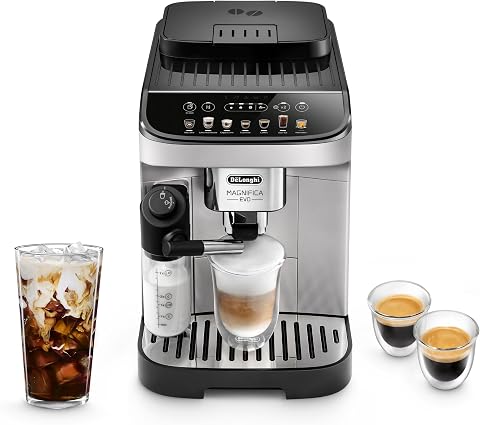
De’Longhi Magnifica Evo Automatic Espresso & Coffee Mach
- ✔ Auto-Clean: Yes
- ✔ Water Tank Capacity: 1.8 liters
- ✔ Grind Settings: 13

De’Longhi Replacement Water Filter
- ✔ Filter Type: Water filtration
- ✔ Compatibility: De’Longhi espresso machines
- ✔ Replacement Interval: Up to 2 months
De’Longhi Magnifica Evo Automatic Espresso & Coffee Mach
The De’Longhi Magnifica Evo offers an auto-clean function that simplifies maintenance. Regular use helps maintain optimal performance and coffee flavor.
Pros:
- Built-in auto-clean feature
- Effective descaling system
- User-friendly interface
- Durable build quality
Cons:
- Requires regular filter replacements
- Descaling solution needed periodically
- Manual component cleaning still necessary
Best for: Users seeking a low-maintenance, high-performance espresso machine
Not ideal for: Those wanting a machine with minimal cleaning routines
Bottom line: Regular cleaning and descaling are essential for peak performance.
De’Longhi Replacement Water Filter
Using the De’Longhi Replacement Water Filter ensures optimal water quality and extends your machine’s lifespan. Easy to install and replace, it helps prevent limescale buildup.
Pros:
- Improves water taste
- Prevents limescale
- Easy to replace
- Enhances machine efficiency
Cons:
- Needs periodic replacement
- Additional cost
- Must remember to replace regularly
Best for: Maintaining water quality in your espresso machine
Not ideal for: If you prefer not to replace filters frequently
Bottom line: A simple upgrade for cleaner-tasting coffee and machine longevity.
Frequently Asked Questions
How often should I run the auto-clean cycle?
It’s recommended to run the auto-clean cycle after approximately 20-30 brewing cycles or when prompted by the machine.
Can I descale the machine without a descaling solution?
While some users use vinegar, it is not recommended. Use a proper descaling solution like De’Longhi EcoDecalk for safe and effective results.
What are the signs that my machine needs descaling?
Signs include longer brewing times, reduced coffee quality, or a descaling alert on the display.
How do I clean the milk frother?
Remove the milk frother, disassemble if possible, and wash all parts with warm, soapy water. Wipe the exterior with a damp cloth.
Keep Your Coffee Perfect with Regular Maintenance
Consistent cleaning and descaling are vital for preserving the quality and longevity of your De’Longhi Dinamica Plus. Using recommended accessories and following the proper steps will ensure every cup tastes as fresh as the first. Invest a little time now, and enjoy flawless espresso day after day.
Affiliate disclosure: As an Amazon Associate we earn from qualifying purchases. Prices and availability are accurate as of the time of publishing.
Evergreen bestsellers Picks
bestsellers
As an affiliate, we earn on qualifying purchases.